Drive off. Your trip logs itself.
Ritvast notices by itself that you're driving and puts every trip in your log: where you left, where you arrived and how many kilometres it was. After the trip, one tap: business or private. At the end of the month a PDF goes to your accountant.
- Free right now, no ads
- No account
- Trips stay on your phone
- English and Dutch
You don't have to think about it.
Your phone already knows when you drive. Ritvast uses that, and only turns on GPS when you're really on the road. That saves your battery.
- 1ParkedGPS offDriving08:12, Oudegracht 1
You get in and drive off.
Your phone notices that you leave the spot where your car was parked, or that you're in a car. Only then does Ritvast turn on GPS. The trip starts where your car stood, at the moment you drove off. Even when the app is closed.
- 2Trip of 43 km loggedBusinessPrivate
You stop.
After 5 minutes standing still, the trip is done. You get one notification: business or private? Tap the answer in the notification, or swipe right or left in your trip list later.
- 3October276 kmBusiness 86, private 190PDF
The month is over.
See your kilometres per type, close the month and send the PDF or spreadsheet to your accountant. Or make an expense claim for your employer.
For everyone who drives for work.
When you start, you pick what fits you. Ritvast then shows exactly the totals you need.
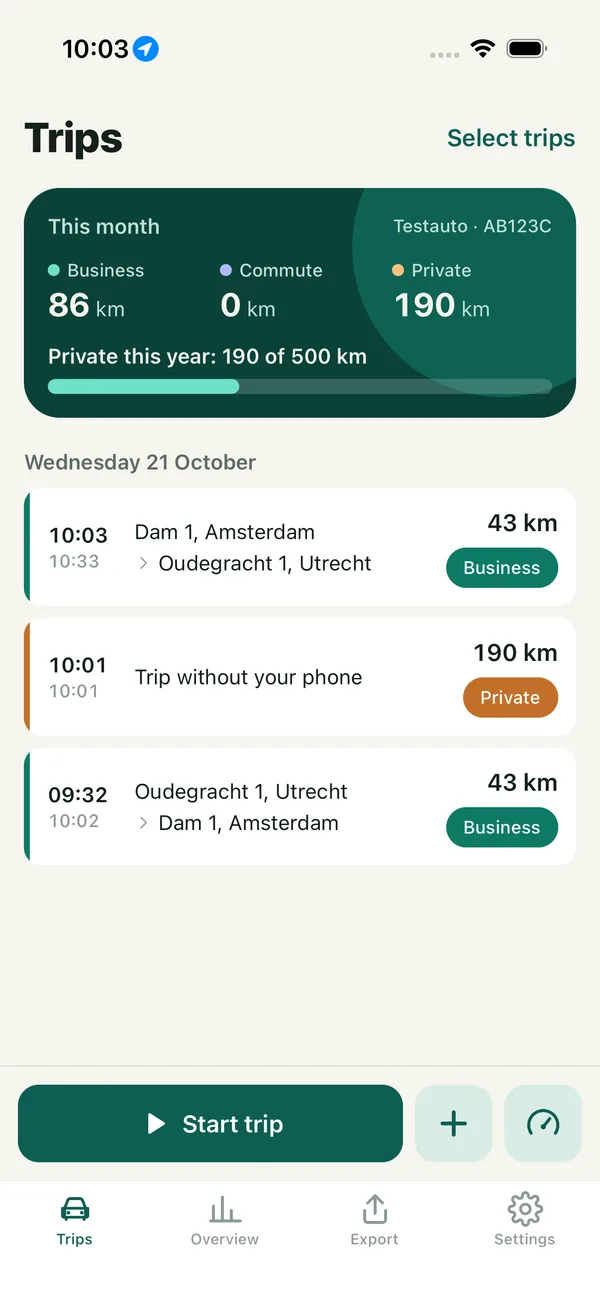
- Private this year190 of 500 km310 km left before the limit
Company car
Show that you drive no more than 500 private km a year, so no benefit is added to your income (bijtelling). Ritvast counts your private kilometres, lowers the limit when you got the car later in the year, and warns you at 75% and 90%.
- Business in your own car, 2026
- Business km
- 1,840
- Per km
- € 0.25
- Deduction
- € 460.00
Freelancer with your own car
Your business kilometres per month and per year, with the amount for your tax return: € 0.25 per km in 2026, € 0.23 in 2024 and 2025. Agreed something else with your accountant? Change the amount yourself.
- October expense claim
- 12 OctUtrecht to Amersfoort€ 11.50
- 12 OctAmersfoort to Utrecht€ 11.50
- 16 OctUtrecht to Gouda€ 9.00
Employee with a mileage allowance
Drive your own car for work? Make an expense claim with the date, from where to where, the kilometres and the amount for every trip. Commute and business are on it, private is not.
VAT registered? The overview also lists your private kilometres for VAT. For VAT, commuting counts as private, and Ritvast adds it in that line.
Calm, clear and in plain words.
Four tabs: Trips, Overview, Export and Settings. Everything you do often sits under your thumb.
Your tripsThis month at a glance. Times, addresses, kilometres and type for every trip. 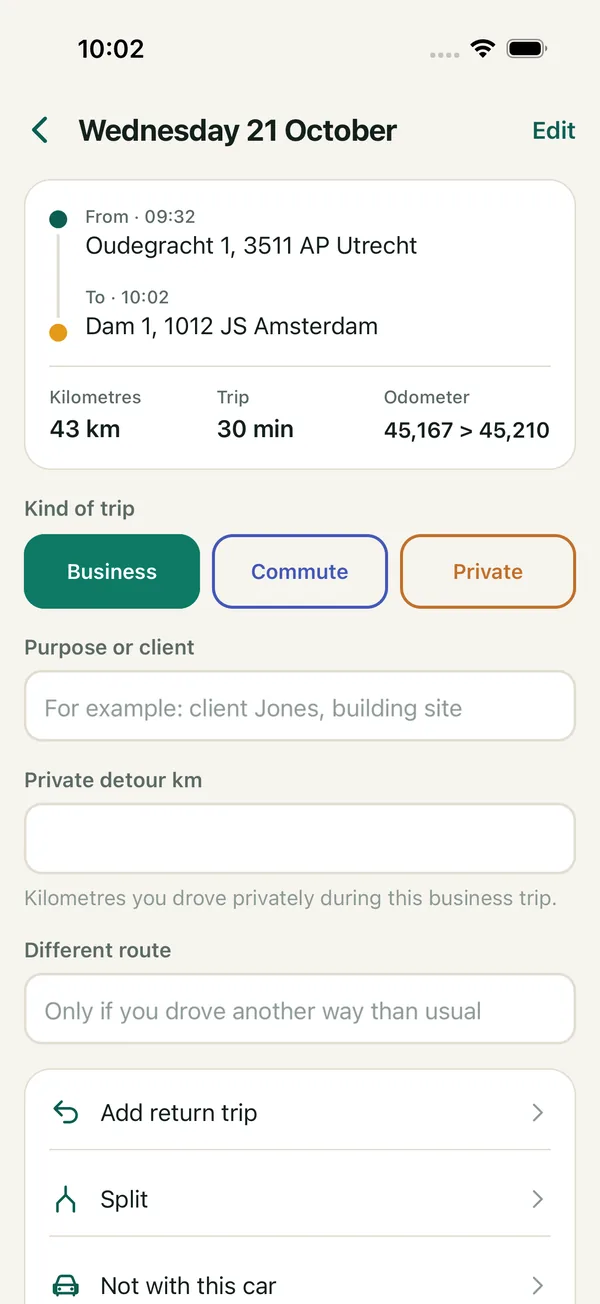
One tripWith the odometer reading, the purpose or client, private detour kilometres and a different route. 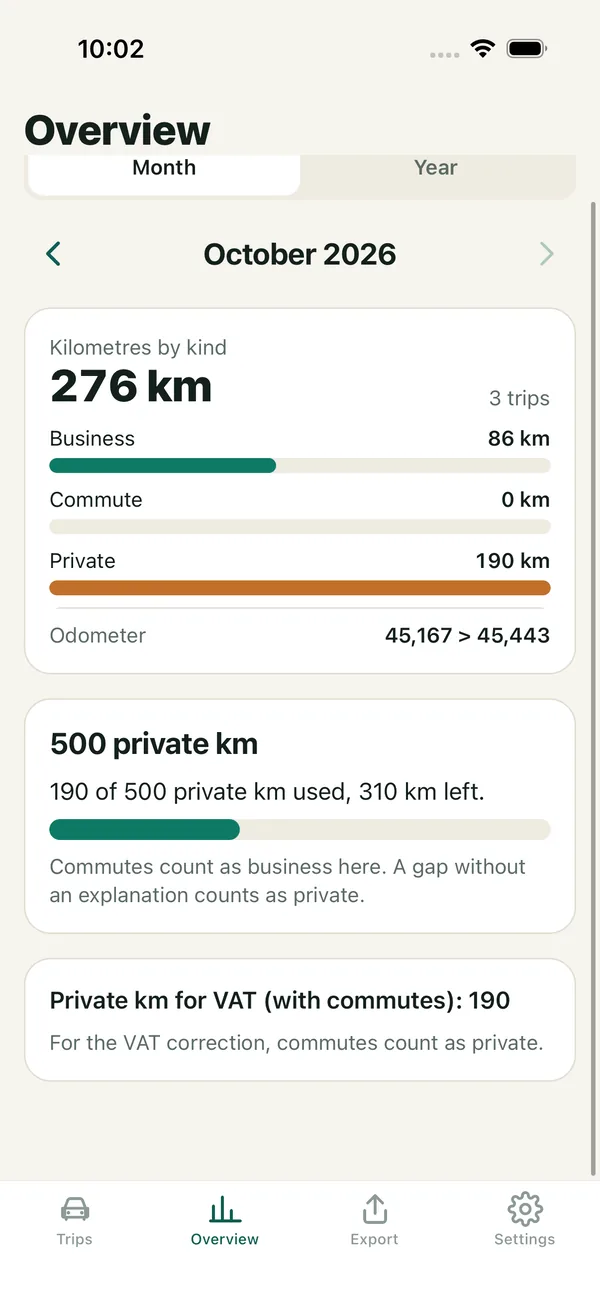
The overviewKilometres per type, the 500 km limit and the private kilometres for VAT. 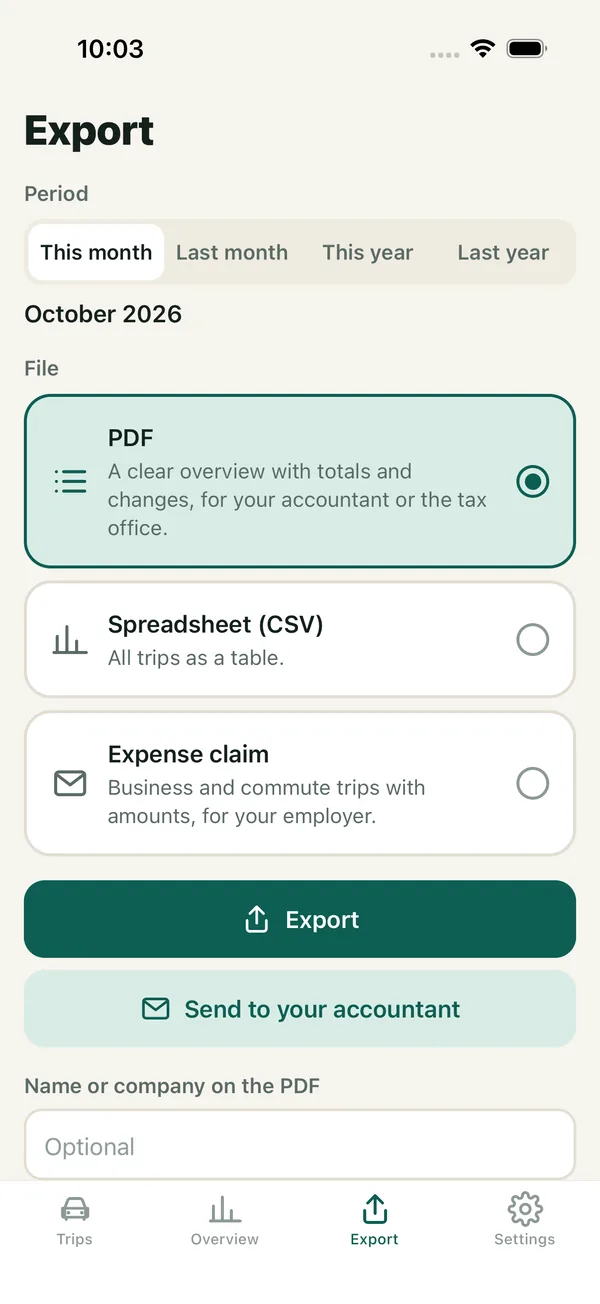
ExportPDF, spreadsheet or expense claim. Or straight to your accountant. 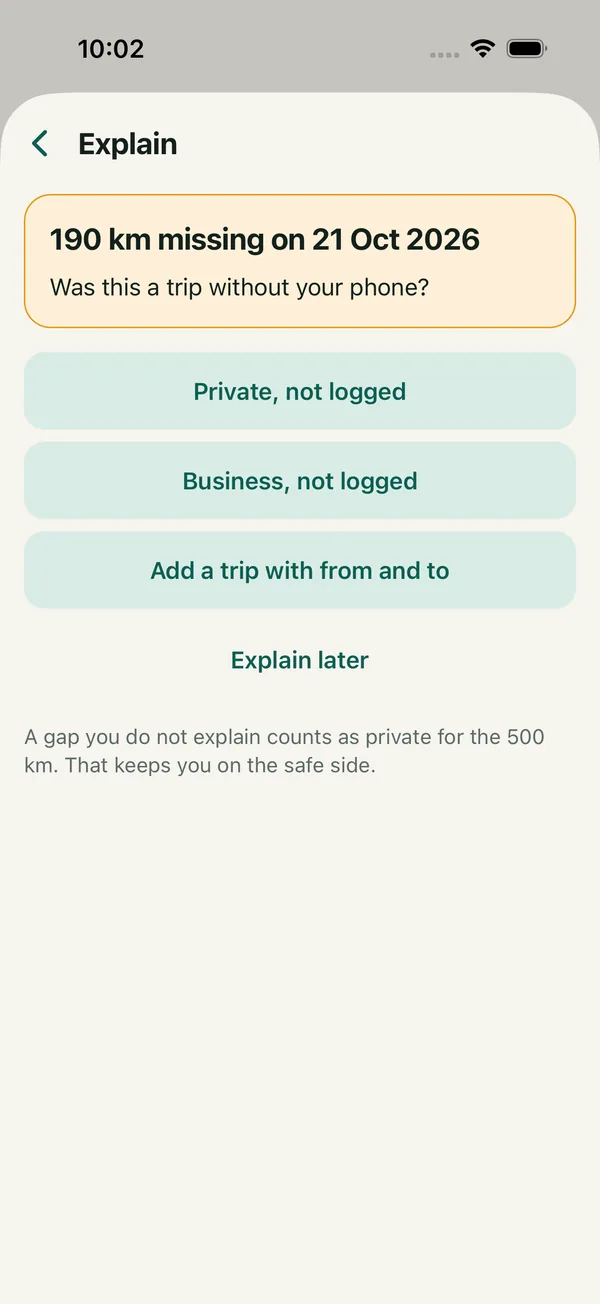
Explain a gapKilometres missing? Ritvast asks what they were. 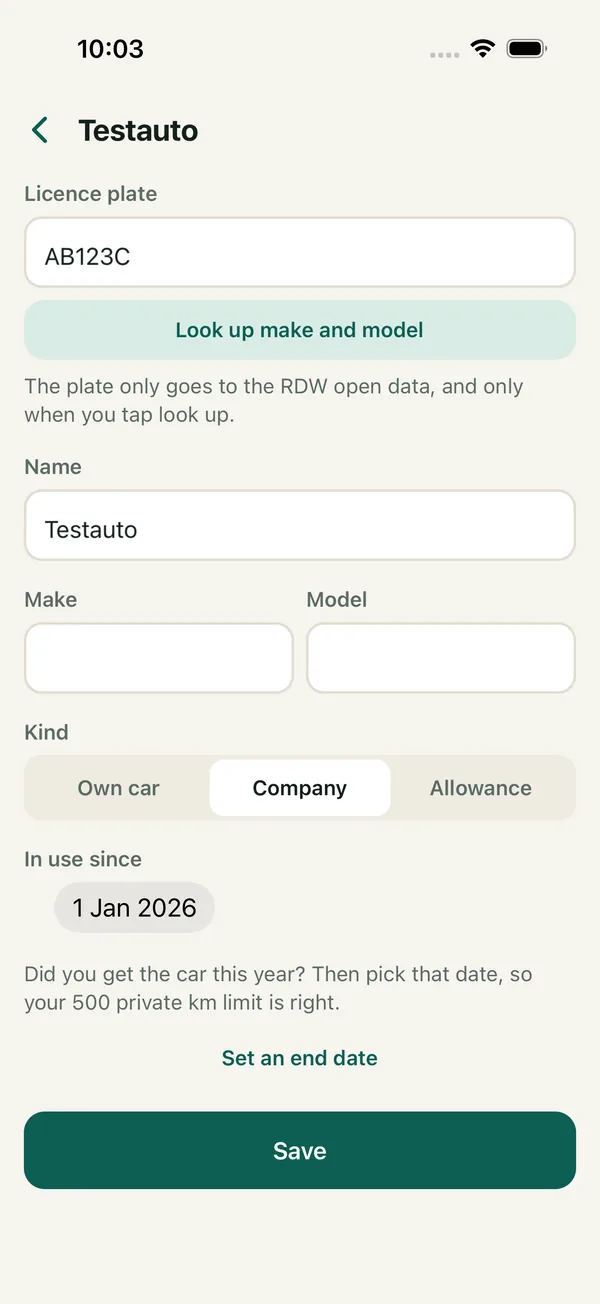
Your carType the plate, get make and model. Every car separately.
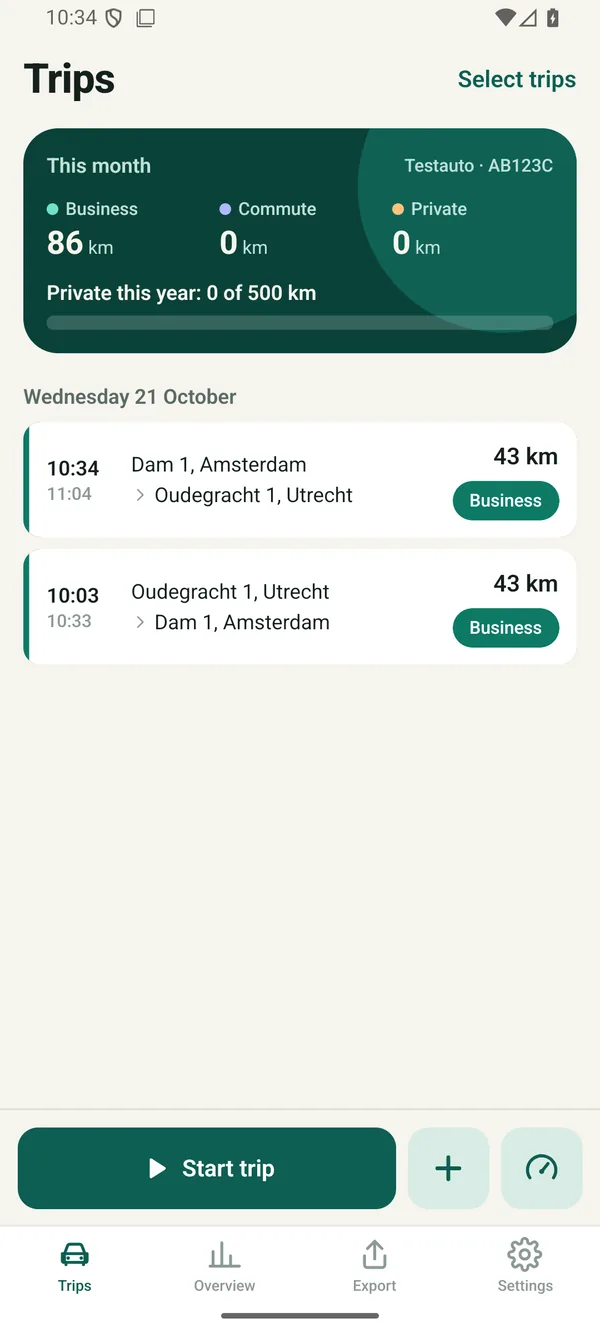
Exactly the same on Android.
Ritvast works on iPhone and on Android, with the same screens and the same PDF. Switching phones? Take your trips along with a backup file.
Your log adds up to the kilometre.
A mileage log has to add up: the end reading of one trip is the start reading of the next. Ritvast keeps track of that for you.
- Enter your odometer reading now and then. When you fill up, for example. GPS sometimes measures a few percent differently from your counter, and Ritvast adjusts the kilometres to it.
- A gap? Ritvast asks what it was. A trip without your phone, private or business. A gap you don't explain counts as private. That keeps you on the safe side.
- Every change stays visible. When you edit a trip, Ritvast keeps what it said first. In the PDF that trip gets an asterisk, and the back lists what changed.
- Close the month. After exporting, you close the month. If you change something after that, that is noted too.
| Date | From, to | Km | Type |
|---|---|---|---|
| 21-10 | Oudegracht 1, Utrecht to Dam 1, Amsterdam | 43 | Business Client De Vries |
| 21-10 | Dam 1, Amsterdam to Oudegracht 1, Utrecht | 43 | Business Client De Vries |
| 21-10 | Trip without phone | 190 | Private * |
| Total | 276 | ||
* Changed after it was logged. The list of changes is at the back of the PDF.
By itself, half by itself or by hand.
Before your phone asks anything, Ritvast explains why on a screen of its own. You can switch any time in Settings.
- Recommended
Automatic
Trips start and stop by themselves, even when the app is closed. For this you give Ritvast 'Always' access to your location.
Half automatic
You tap Start trip when you set off. The trip stops by itself. Location only while you use the app.
By hand
You type in your trips with your odometer reading. Ritvast then uses no location. Same as and Add return trip make it quick.
Your trips stay on your phone.
No account, no server of ours, no ads and no tracking. We can't see your trips.
trips that reach us. Your trips are part of your phone's normal backup, and otherwise only go to whoever you send a PDF or spreadsheet.
What your phone does look up, without it reaching us
- Street namesYour phone's address service turns the start and end point into an address. On iPhone that's Apple, on Android Google.
- The mapThe map images come from OpenFreeMap. The map area goes along, as with any map.
- Only when you tap itYour licence plate to the RDW's open data, and your search text to PDOK when you look up an address.
- A version checkNow and then Ritvast asks this website whether a new version is needed. Nothing about you goes along.
What does a Dutch mileage log need?
Per trip the date, the odometer reading, the addresses, business or private, private detour kilometres and a different route. We list the rules for company cars, freelancers and employees, with the sources.
- Per tripWho fills it in
- The dateBy itself
- The odometer reading at departure and arrivalBy itself
- The departure address and the arrival addressBy itself
- Business or privateOne tap from you
- Private detour kilometresYou, if it applies
- The route, when it differsYou, if it applies
What people ask.
Is Ritvast really free?
Yes. Ritvast is free right now, with no ads and nothing to buy in the app. You don't need an account either.
Which phones does it work on?
On an iPhone with iOS 16.4 or later, and on an Android phone with Android 10 or later. In Dutch and in English: the app follows your phone's language.
Do I need to open the app when I drive?
No. In automatic mode a trip starts by itself, even when the app is closed. For this you give Ritvast 'Always' access to your location. Rather not? Then choose half automatic and tap Start trip yourself.
Does it use a lot of battery?
While you're parked, Ritvast uses no GPS. The app only turns GPS on when you drive off, and off again once you've stood still for 5 minutes. How much a trip costs exactly differs per phone.
What if the app misses a trip?
Add it with the plus in your trip list, or tap Same as on a trip you drove before. Enter your odometer reading now and then: Ritvast then sees when kilometres are missing and asks what they were. Trips often don't start by themselves? See Support for how to turn off your phone's battery saving.
Is my mileage log in order with this?
For every trip, Ritvast records everything the Dutch tax office (Belastingdienst) lists, and it keeps your odometer readings adding up. Whether your log meets the rules is for you, or your accountant, to judge. Ritvast does not carry the Keurmerk RitRegistratieSystemen. Also read what a Dutch mileage log needs.
Can I keep track of more than one car?
Yes. Add each car with its licence plate. When you tap it, Ritvast looks up the make and model in the RDW's open data. Drove a trip in another car? Move it there with one tap.
I'm getting a new phone. Do I lose my trips?
No. Your trips are part of your phone's normal backup: iCloud on iPhone, Google on Android. You can also make your own backup file at Export and restore it on your new phone.
Can you see where I drive?
No. You have no account and we have no server that receives your trips. Everything stays on your phone. Only you decide where a PDF or spreadsheet goes.
Your question isn't here? See Support or email info@abn.company.